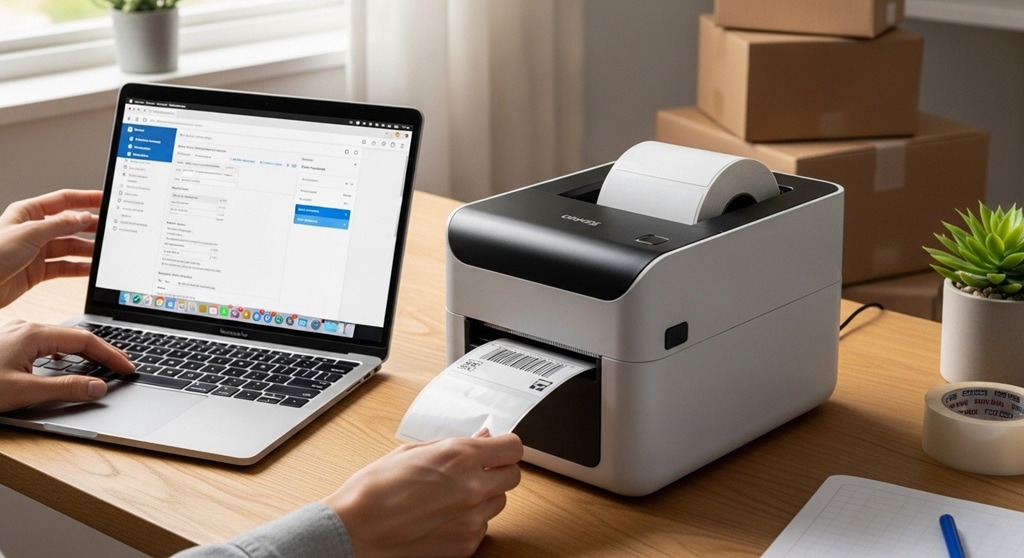
A shipping label printer is a thermal printer designed to print 4×6 shipping labels quickly and without ink. eCommerce sellers use it to streamline order fulfillment, reduce printing costs, and improve shipping accuracy.
If you ship daily, your printer is not just hardware. It is your production line.
Many new sellers start with a regular inkjet printer. It works. But it slows down operations. Ink runs out. Labels smear. Paper jams happen at the worst time.
A dedicated 4×6 label printer uses thermal technology. That means no ink cartridges. No toner. Just heat and thermal labels. According to multiple fulfillment case studies from small Amazon and eBay stores, sellers reduced labeling time by up to 40% after switching to a thermal printer. Fewer steps. Fewer errors. Faster dispatch.
If you sell on Amazon, eBay, Shopify, or Etsy, shipping labels are part of daily workflow. The right setup helps you:
- Print labels in one click
- Avoid resizing issues
- Reduce per-label cost
- Improve shipping accuracy
- Meet carrier scan standards
In short, if you ship more than 5–10 orders per day, a thermal shipping label printer is not optional. It is infrastructure.
How Does a 4×6 Label Printer Work?
Short Answer: A 4×6 label printer uses direct thermal technology to print shipping labels without ink by applying heat to thermal paper.
Most eCommerce sellers use direct thermal printers. These printers heat specific areas of the label paper, turning it black to create text and barcodes.
Why 4×6 Size?
Major carriers like USPS, UPS, FedEx, and DHL use 4×6-inch labels as standard format. Platforms like Amazon Seller Central and eBay automatically generate labels in this size.
Using standard size ensures:
- Barcodes scan correctly
- No resizing needed
- Compliance with carrier requirements
- Faster warehouse acceptance
Industry data from shipping carriers shows barcode readability directly affects delivery speed. Poor print quality increases manual processing.
A 4×6 thermal printer eliminates scaling errors common with A4 printouts.
What Do You Need Before Setting Up Your Shipping Label Printer?
Short Answer: You need a thermal printer, 4×6 thermal labels, USB or network connection, and shipping software access from Amazon or eBay.
Basic Setup Checklist
- 4×6 thermal label printer
- Roll or fanfold thermal labels
- USB cable or Wi-Fi connection
- Computer (Windows or Mac)
- Access to Amazon seller tools or eBay shipping setup
Before plugging anything in, confirm compatibility. Most modern thermal printers support Windows and macOS. Some also support Chromebook and mobile printing.
Always download the official driver from the manufacturer’s website. Generic drivers cause formatting issues.
How Do You Install a 4×6 Label Printer on Windows or Mac?
Short Answer: Install the printer driver, connect via USB or Wi-Fi, set default paper size to 4×6, and test print.
Step 1: Install Driver
Download the latest driver from the printer brand’s website. Install before connecting the printer.
Step 2: Connect the Printer
Use USB for stable connection. For multiple workstations, use Ethernet or Wi-Fi models.
Step 3: Set Default Label Size
Open printer preferences. Set paper size to 4×6 inches (100mm x 150mm). Disable scaling.
Step 4: Run a Test Print
Most printers include calibration mode. Run calibration to align labels properly.
Calibration prevents misaligned prints and wasted labels. Sellers report up to 8% label waste when calibration is skipped.
How Do You Configure a Shipping Label Printer for Amazon Seller Tools?
Short Answer: In Amazon Seller Central, select 4×6 format in shipping settings and ensure printer scaling is set to 100%.
Inside Amazon Seller Central:
- Go to Orders → Manage Orders
- Select Buy Shipping
- Choose label format: 4×6 thermal
- Download as PDF
When printing:
- Select your thermal printer
- Ensure scaling is set to “Actual Size”
- Disable “Fit to Page”
Amazon’s internal seller documentation shows that label scanning failures often come from incorrect scaling. Even 95% scaling can distort barcodes.
If you use third-party Amazon seller tools like ShipStation or Pirate Ship, configure label size in their print settings to 4×6 thermal.
How Do You Complete eBay Shipping Setup with a 4×6 Label Printer?
Short Answer: In eBay shipping preferences, select 4×6 label format and print directly from order details.
Inside eBay Seller Hub:
- Go to Orders
- Select Print Shipping Label
- Choose label size: 4×6
- Confirm carrier
eBay shipping setup is straightforward. But common mistakes include:
- Printing from mobile without format check
- Browser auto-scaling PDFs
- Incorrect default printer selection
Always preview before printing. Barcode must be clear and centered.
How Can You Optimize Your Label Printing Workflow for Speed?
Short Answer: Use bulk label printing, keyboard shortcuts, and automation tools to reduce manual steps.
Efficiency matters. If you ship 50 orders per day and save 20 seconds per order, that is over 16 minutes saved daily.
Optimization Tips
- Use bulk print option in Amazon or eBay
- Set thermal printer as default
- Use a label stand for roll stability
- Automate order syncing via shipping software
- Use barcode scanners for SKU verification
Case example: A mid-volume Amazon seller processing 70 orders daily reduced fulfillment time by 35% after switching to bulk thermal printing and barcode verification.
Small changes compound fast.
What Are Common Shipping Label Printer Problems and Fixes?
Short Answer: Most issues come from scaling errors, outdated drivers, or incorrect label calibration.
| Problem | Cause | Solution |
|---|---|---|
| Barcode not scanning | Scaling issue | Set to 100% actual size |
| Label misaligned | No calibration | Run printer calibration |
| Blank labels | Wrong label orientation | Flip label roll |
| Faded print | Low heat setting | Adjust print density |
Most fixes take under five minutes. Do not replace hardware before checking settings.
How Much Does It Cost to Run a 4×6 Label Printer?
Short Answer: Thermal label cost ranges between $0.02–$0.05 per label, with no ink cost.
Inkjet printing can cost $0.15–$0.25 per label including ink and paper. Thermal reduces recurring cost significantly.
For a seller shipping 1,000 orders monthly:
- Inkjet estimate: $150–$250
- Thermal estimate: $20–$50
Annual savings can exceed $1,200.
That alone pays for the printer within months.
Is a Shipping Label Printer Worth It for Small Sellers?
Short Answer: Yes, if you ship consistently, even at low volume.
Even sellers shipping 5–10 orders per day benefit from:
- Faster dispatch
- Lower consumable cost
- Professional packaging
- Reduced errors
As your store grows, systems must scale. Printer setup is foundational.
Conclusion: Ready to Upgrade Your Shipping Workflow?
Shipping is not just logistics. It is customer experience.
A properly configured 4×6 label printer removes friction from your fulfillment process. It saves time. It cuts cost. It improves accuracy. Whether you use Amazon seller tools or complete an eBay shipping setup daily, the right printer configuration prevents avoidable delays.
The setup process takes under 30 minutes. The efficiency gain lasts for years.
If you are serious about scaling your eCommerce business, treat shipping like infrastructure. Upgrade your system. Optimize your workflow. Track your time savings.
Next Step: Audit your current shipping process today. If printing labels feels slow or messy, switch to a thermal 4×6 label printer and implement the setup steps outlined above.
Frequently Asked Questions (FAQ)
1. Can I use a regular printer instead of a 4×6 label printer?
Yes, but it is less efficient. Regular printers require ink and cutting paper. Thermal printers are faster and cheaper long term.
2. Do Amazon seller tools support thermal printers?
Yes. Amazon Seller Central supports 4×6 thermal label format directly in shipping settings.
3. Is Wi-Fi or USB better for label printers?
USB is more stable for single workstations. Wi-Fi is better for shared office setups.
4. Why is my shipping label printing too small?
This happens due to scaling settings. Set print size to 100% or “Actual Size.”
5. How long do thermal labels last?
Direct thermal labels typically remain readable for 6–12 months under normal storage conditions.
6. Can I use a 4×6 label printer for FBA shipments?
Yes. Amazon FBA box labels and shipment labels are compatible with 4×6 format.
7. What is the best way to prevent label waste?
Run calibration after installing new labels and confirm correct size in printer preferences.
Related Topic: How to Choose the Right Surf Fishing Rig for Live and Cut Bait
Read Next: How to Find Global Career Opportunities for Women